What are the Best HMI Programming Techniques for Global Buyers?
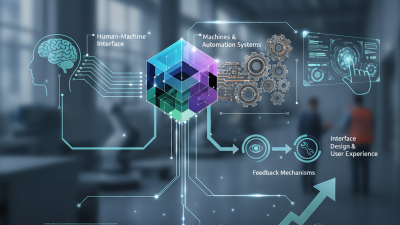
HMI programming serves as a critical element for manufacturers and developers worldwide. This technology allows for seamless interaction between operators and machinery. In an increasingly global market, the demand for effective HMI solutions has surged. Quality HMI programming techniques are essential for ensuring user satisfaction and operational efficiency.
Global buyers often face challenges in selecting the best practices. They require insights that focus on usability, responsiveness, and design. A strong understanding of these techniques can greatly enhance user experience. Experienced professionals emphasize the importance of iterative design and user feedback in the HMI programming process. Effective communication between teams also plays a key role in refining solutions.
However, not all implementations meet expectations. It's essential to reflect on past projects to identify shortcomings. Continuous learning and adaptation are vital in this field. As technology evolves, so do the best practices in HMI programming. This ongoing evolution presents both challenges and opportunities for global buyers seeking to enhance their systems.

Best Practices for HMI Programming: A Global Perspective
In today's global market, Human-Machine Interface (HMI) programming requires a keen understanding of diverse user needs. Different regions have distinct preferences, cultures, and languages. Recognizing these factors can improve usability and subsequent user satisfaction. Invest time in understanding local standards and guidelines to enhance your design process.
Tips: Research local user behaviors. Use surveys to gather detailed feedback on existing interfaces. This information can guide your design choices effectively.
Accessibility is another critical aspect to consider. Ensure that your HMI interfaces are user-friendly for people with disabilities. Tools for testing accessibility features can help identify potential issues before launching. Remember that improving accessibility can increase your user base.
Gathering insight from real users is invaluable. Conduct usability tests with a diverse group to gather genuine feedback. Analyze their interactions and watch for pain points. This iterative process can highlight areas needing refinement. Balancing user expectations while adhering to programming standards may seem challenging but is crucial for successful HMI development.
Key Considerations for Selecting HMI Software Solutions
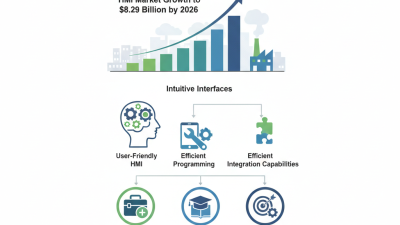
When selecting HMI software solutions, several key considerations come into play. User interface design is paramount. An intuitive interface enhances operator efficiency and reduces errors. In a recent report by ResearchAndMarkets, it was found that well-designed HMIs can increase productivity by up to 20%. Companies should prioritize ease of use over flashy features.
Another factor is integration capabilities. The best HMI solutions should seamlessly integrate with existing systems and equipment. According to a study by IndustryWeek, 65% of manufacturers reported integration challenges as a major barrier to productivity. Organizations need to ensure that their chosen solution can communicate across various devices and platforms.
Tip: Always conduct a trial or seek demos before finalizing your choice. This allows you to evaluate real usability and integration potential.
Scalability is essential as well. As operations grow, the HMI must adapt. A solution that meets current needs might not suffice in the future. A report from MarketsandMarkets highlighted that 75% of companies regret not choosing scalable solutions early on.
Ultimately, a thoughtful approach to HMI software selection pays off in efficiency and adaptability, which are crucial in today’s competitive landscape.
Essential Techniques for Efficient HMI User Interface Design
Designing an effective Human-Machine Interface (HMI) requires a keen understanding of user needs and behaviors. Begin by conducting thorough user research. This helps in identifying what users truly need from the interface. Clarity is paramount. Users should easily navigate the interface without confusion. Clear labels and intuitive pathways guide them naturally.
Utilizing visual hierarchy is another vital technique. Prioritize information based on its importance. Use size, color, and placement to draw attention to key elements. However, it’s not just about aesthetics. Strive for functionality. A beautiful interface may falter if users find it hard to operate. Testing is crucial. Gather feedback and observe user interactions. This process reveals areas needing improvement. Expect to iterate repeatedly. Mistakes can illuminate solutions.
Lastly, accessibility cannot be overlooked. Incorporating features that accommodate diverse users ensures inclusivity. This includes color contrast, text size, and alternative text for images. Although these considerations may seem minor, they significantly enhance user experience. Reflection on design choices is essential. Every decision shapes user interaction. As techniques evolve, staying adaptable is key in creating efficient HMI designs.
Integrating Industrial Standards in HMI Programming
Integrating industrial standards in HMI (Human-Machine Interface) programming is crucial for global buyers. Adhering to these standards ensures that systems work consistently across various platforms. This consistency enhances communication between machines and operators. It also streamlines processes in multinational operations, reducing operational risks.
One effective approach is to map out existing standards. Identify which standards apply to your industry. Understanding these can clarify what your HMI should achieve. Compliance with standards improves usability, safety, and efficiency. Tip: Engage with industry experts to stay updated on emerging standards.
Furthermore, applying best practices in design plays a vital role. This includes creating user-friendly interfaces that prioritize ease of use. Use clear visuals and simple navigation to reduce the learning curve. Tip: Regularly gather user feedback to find areas needing improvement. A responsive design is not just beneficial; it's essential for optimal performance.
Finally, reflect on your practices. Are they aligned with current standards? Are they meeting the needs of users effectively? Continuous assessment is key. Integrating standards should not be a one-time task; it requires ongoing adjustments to keep pace with technological advancements.
Comparison of HMI Programming Techniques Adoption Rates
Future Trends in HMI Programming for Global Markets
As industries evolve, the demand for Human-Machine Interface (HMI) programming continues to rise. Reports indicate that the global HMI market is projected to reach $7.5 billion by 2025, growing at a CAGR of 8.1%. This growth reflects a trend towards more intuitive interfaces. Users seek visually appealing designs that enhance user experience and boost productivity.
Future trends showcase increased adaptability and integration. HMI systems are shifting toward cloud-based solutions, allowing for real-time data access. This transition can streamline operations but may also introduce security vulnerabilities that need addressing. Also, predictive maintenance through advanced analytics is on the rise, helping industries avoid costly downtimes by predicting equipment failures before they occur.
Incorporating AI into HMI systems is gaining traction. AI can enhance decision-making processes by providing actionable insights based on user interactions. However, reliance on AI brings challenges such as algorithm bias and the need for continuous monitoring. As these technologies advance, companies must balance innovation with the principles of transparency and user trust.