What is HMI Programming and How to Get Started with It
HMI programming, or Human-Machine Interface programming, is a vital component in the world of automation and control systems. As industries increasingly rely on sophisticated machinery and technology, the need for effective communication between human operators and machines becomes paramount. According to industry expert Dr. Emily Roberts, “The future of automation lies in how intuitively we can interact with our machines, and HMI programming is the key that unlocks this potential.” With an ever-evolving landscape of software and interfaces, understanding the principles of HMI programming can set the foundation for success in various fields, from manufacturing to healthcare.
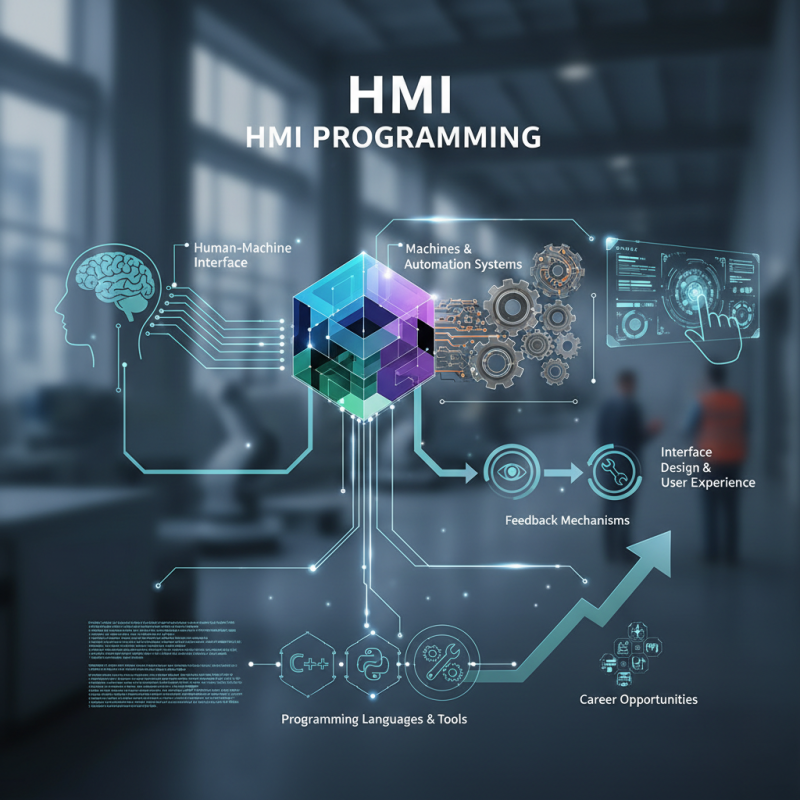
Getting started in HMI programming involves grasping essential concepts such as interface design, user experience, and feedback mechanisms. Aspiring programmers must familiarize themselves with various programming languages and tools that facilitate HMI development. By acquiring these skills, individuals can effectively bridge the gap between complex systems and the end-users who rely on them, ensuring smooth operations and enhanced productivity. As the demand for skilled HMI programmers continues to rise, investing time in learning this discipline could lead to rewarding career opportunities in the rapidly advancing tech-driven world.
What is HMI Programming: A Comprehensive Overview
Human-Machine Interface (HMI) programming is a crucial aspect of modern automation systems, enabling effective communication between operators and machines. At its core, HMI programming allows users to create graphical interfaces that display machine data, control processes, and visualize operations in real-time. This comprehensive overview emphasizes the significance of HMI programming in industrial contexts, where timely and accurate information is vital for decision-making and operational efficiency. By leveraging user-friendly interfaces, operators can easily monitor complex systems, adjust parameters, and respond quickly to alerts.
To start with HMI programming, one must become familiar with the principles of industrial automation and understand the specific requirements of their application. Programming typically involves using dedicated software tools that provide a range of features, including drag-and-drop design components, scripting capabilities for advanced logic, and connectivity options to interface with various controllers and sensors. Learning the basics of information architecture and user experience design is equally important to ensure that the HMI is intuitive and meets the end-user's needs. Aspiring programmers should explore available resources, such as online tutorials and forums, to deepen their understanding and acquire practical skills in developing effective HMI solutions.
What is HMI Programming and How to Get Started with It
| Aspect |
Description |
| Definition |
HMI programming refers to the process of designing user interfaces for machines and systems, allowing users to interact with and control equipment. |
| Key Components |
Screens, Controls, Data Visualization, Alarms and Notifications, Communication Interfaces. |
| Common Software Tools |
SCADA systems, PLC programming tools, and specialized HMI software platforms. |
| Skills Required |
Understanding of programming logic, knowledge of control systems, user interface design principles, and familiarity with industrial communication protocols. |
| Learning Resources |
Online courses, tutorials, community forums, and textbooks focusing on HMI programming and related fields. |
| Real-world Applications |
Manufacturing automation, energy management systems, HVAC controls, and process control industries. |
| Future Trends |
Integration of AI for predictive maintenance, enhanced user experience with IoT, and mobile HMI solutions. |
Key Components of HMI Programming Systems
HMI programming involves the development of interfaces that allow humans to interact with machines, primarily in industrial settings. A key component of HMI programming systems is the graphical user interface (GUI), which serves as the visual aspect through which operators monitor and control processes. A well-designed GUI not only displays real-time data but also offers intuitive controls that enhance user experience and operational efficiency. Elements such as buttons, sliders, and data grids are essential for effective interaction.
Another important component is the communication protocols utilized in HMI systems. These protocols facilitate data exchange between the HMI and various industrial devices, such as sensors, PLCs, and remote control systems. Standardized communication mechanisms ensure compatibility and reliability, enabling a seamless flow of information. Additionally, the backend logic, which includes data processing and decision-making algorithms, plays a vital role in interpreting inputs and executing commands based on user interactions, further streamlining the operational workflow.
Step-by-Step Guide to Getting Started with HMI Programming
Getting started with HMI programming involves understanding both the concepts behind Human-Machine Interfaces and the practical steps to create effective applications. First, it's essential to familiarize yourself with the basic components of HMI systems, including their architecture, the types of graphical user interfaces (GUIs), and the data communication methods used to connect HMIs with machines. A solid understanding of these fundamentals will aid in designing user-friendly interfaces that enhance operational efficiency.
Once you have grasped the basic principles, the next step is to choose the right programming environment. Various software tools are available for HMI development, each offering unique features and capabilities. Start by exploring tutorials and documentation provided by the software. After selecting a tool, begin building simple projects to practice. Focus on creating clear visual displays, implementing user inputs, and ensuring real-time data monitoring. Testing your applications in a simulated environment can help identify potential issues before actual deployment. This hands-on experience will build your confidence and skills as you advance in HMI programming.
HMI Programming Skills Development
Common Tools and Software Used in HMI Programming
HMI programming, or Human-Machine Interface programming, is essential for creating user-friendly interfaces that allow operators to easily interact with machinery and control systems. To effectively embark on this journey, familiarizing oneself with the common tools and software used in the field is crucial. Popular tools typically include software platforms designed for graphical interface creation, communication setups, and hardware integration. Understanding these tools not only speeds up the learning curve but also enhances the overall effectiveness of the programming process.
When starting with HMI programming, users should prioritize hands-on experience with simulation tools that can help visualize operations before implementation. It is beneficial to experiment with open-source HMI software, which provides a cost-effective way to learn the ropes without significant financial commitment. Additionally, engaging in community forums related to HMI development can offer practical insights and solutions from seasoned professionals.
Tips for success include focusing on user experience design principles to make interfaces intuitive and efficient, and regularly testing your designs with actual users to gather feedback. It’s also wise to stay updated with the latest trends and technologies in automation and control systems to make your programming skills more relevant and effective. Continuous learning through online tutorials and workshops can significantly enhance both knowledge and proficiency in HMI programming.
Best Practices and Tips for HMI Programming Success
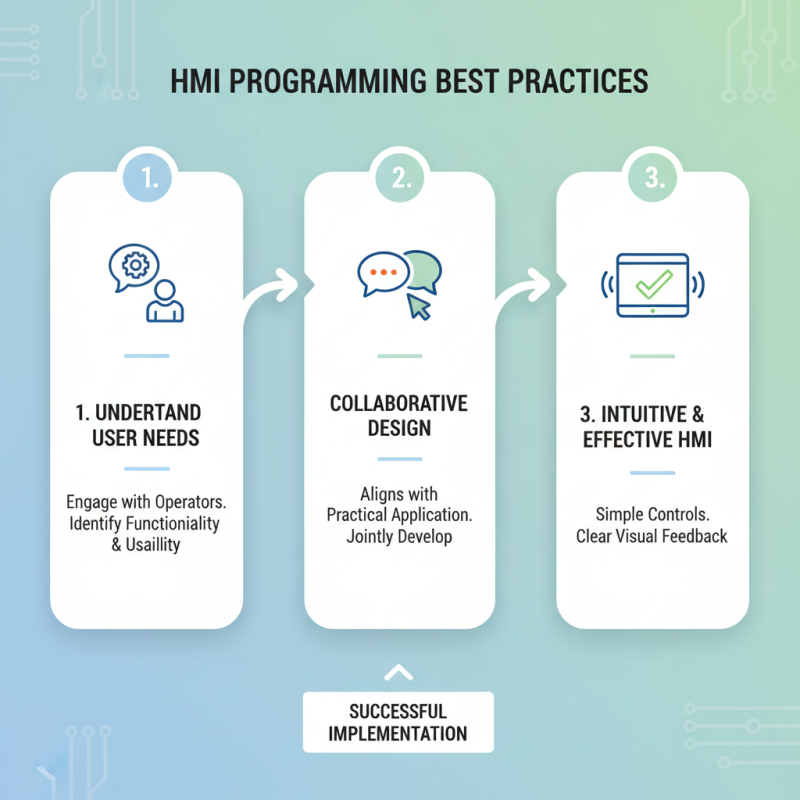
When venturing into HMI programming, adhering to best practices is crucial for successful implementation. First and foremost, it’s essential to understand the end-user needs. Engaging with operators can provide insights into the necessary functionalities and usability requirements of the interface. This collaboration ensures the HMI design aligns with practical application, allowing for intuitive controls and effective visual feedback.
Another important tip is to prioritize simplicity and clarity in your design. Overcomplicating interfaces with excessive information can lead to confusion and errors. Use consistent terminology and visual elements for navigation to enhance user experience. Furthermore, testing the interface with real users is vital. Gathering feedback during the development process allows for iterative improvements, ensuring the final product is both user-friendly and efficient. Regularly revisiting these best practices throughout the programming process can significantly increase the chances of HMI programming success.